
Part of our Free Online Tools collection
Most students learn mathematics by staring at numbers on a page. A matrix is a grid of values. A sine wave is a formula. A multiplication table is something to memorize. But what if you could visualize math in 3D — watch equations draw themselves, see matrices reshape space, and understand multiplication as geometry rather than memorization? That is exactly what Rigel Math Visualizer does, and it runs entirely free in your browser.
Why Visualizing Math Changes Everything
Research in mathematics education consistently shows that learners who develop geometric intuition alongside algebraic skill outperform those who rely on memorization alone. The problem is that visualization has historically required expensive software, specialist training, or a very patient teacher with a good whiteboard.
Rigel changes that. It is a free, browser-based tool that takes a mathematical input — an equation, a matrix, or two numbers to multiply — and renders the result as an interactive 3D scene you can orbit, zoom, and explore with your mouse or finger.
No installation. No account. No data sent to any server. Just mathematics made visible.
Three Ways to Visualize Math in 3D
1. Equation Mode – Draw Any Function
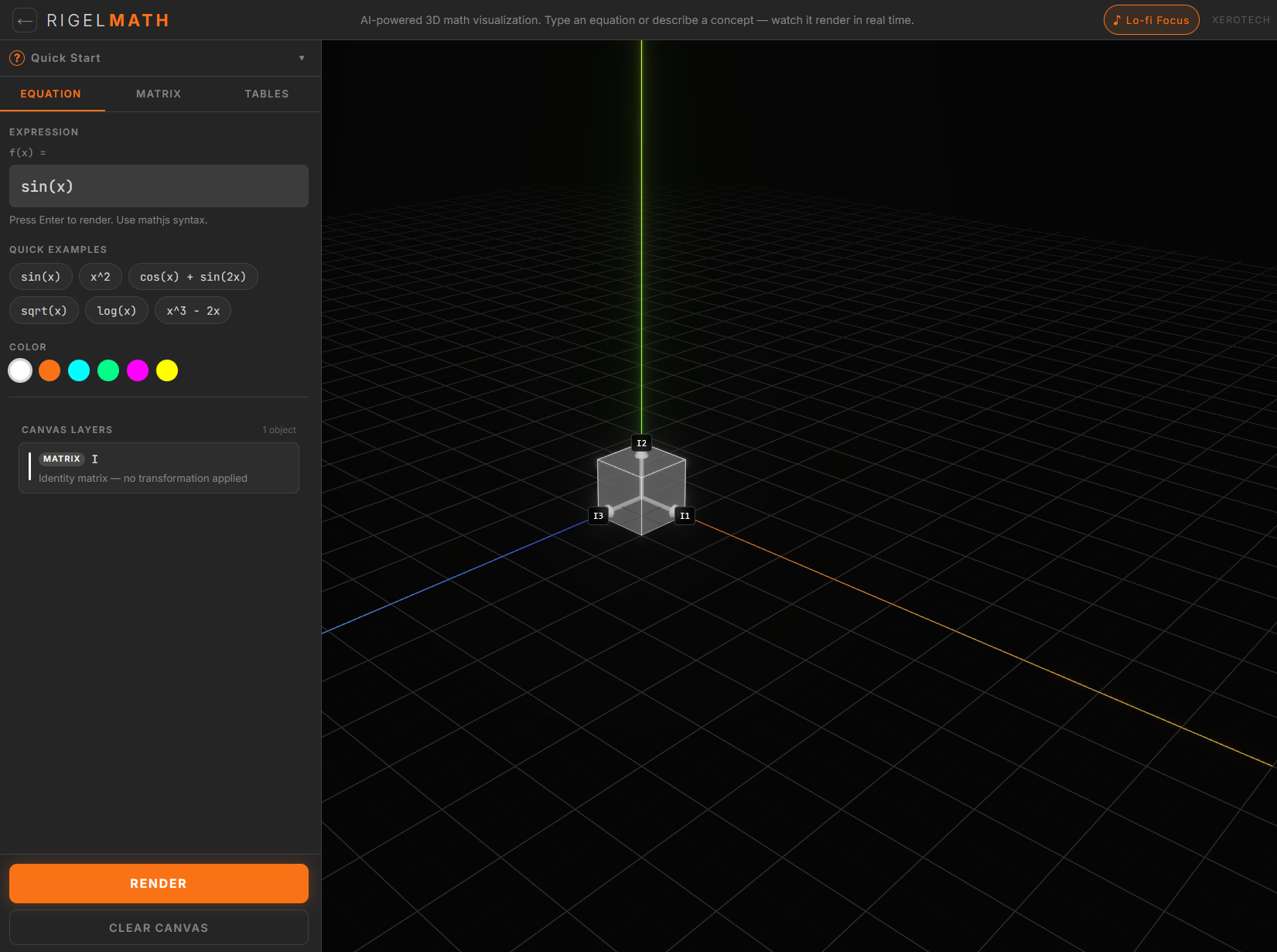
Type any mathematical expression and Rigel draws it instantly as a glowing curve in 3D space. You can enter standard functions like sin(x), x^2, cos(x) + sin(2x), sqrt(x), or log(x) — anything supported by standard mathematical notation.
What makes this powerful for learning is persistence. Unlike a graphing calculator that shows one result at a time, Rigel layers multiple functions on the same canvas simultaneously. Type sin(x), render it in white. Then type cos(x), render it in orange. Both curves live in the same 3D space, and you can rotate the entire scene to see how they relate from any angle.
This is how mathematicians actually think — not one equation at a time, but building up a picture incrementally, comparing, contrasting, and developing spatial intuition.
2. Matrix Mode – See Linear Transformations
A 3×3 matrix is one of the most abstract concepts in mathematics. Students can memorize the multiplication algorithm without ever understanding what a matrix actually does: it transforms space.
In Rigel’s Matrix Mode, you enter values directly into a 3×3 grid. Choose an operation — multiply, invert, transpose, find eigenvalues, compute the determinant, or raise to a power — and click Render. Rigel draws the result as a three-dimensional parallelepiped: a box whose shape, size, and orientation reflect exactly what that matrix does to the space around the origin.
The column vectors are shown as arrows pointing in the directions the matrix stretches space. A rotation matrix shows the cube rotating. An inversion matrix shows it flipping. A singular matrix — one with determinant zero — collapses the cube flat, making it immediately obvious why singular matrices have no inverse.
This is the geometric intuition that university students spend entire semesters trying to build. Rigel makes it immediate and interactive.
3. Times Tables Mode – Multiplication as Geometry
Times tables are where many young learners first encounter mathematics anxiety. Memorizing 7×8=56 by repetition works eventually, but it leaves children with no understanding of what multiplication actually means.
Rigel’s Times Tables Mode offers three ways to see multiplication as geometry:
- Area Grid — 3×4 renders as a rectangle of 12 glowing unit squares. The student sees that multiplication is area — rows times columns. The product is not an arbitrary number to memorize; it is the count of squares that fill a shape.
- Dot Array — the same 3×4 as 12 glowing dots arranged in rows and columns, making the commutative property (3×4 = 4×3) visually obvious when you rotate the scene.
- Number Line — a dot jumping along a line, landing at 4, 8, 12 with orange bloom on each landing. Skip counting becomes visible as movement, not just recitation.
For educators, these three modes map directly to three different learning styles. A student who does not respond to the area model may immediately understand the number line. Having all three in one tool, instantly switchable, makes differentiated instruction genuinely practical.
How to Use Rigel Math Visualizer
Getting started takes about thirty seconds:
- Go to Rigel Math Visualizer
- Choose your input mode — Equation, Matrix, or Tables — from the tabs in the left panel
- Enter your expression or values
- Click Render — your math appears instantly in the 3D canvas
- Drag to orbit the scene, scroll to zoom, right-click to pan
- Add more objects — they layer on the same canvas
- Click Wipe Canvas when you want a fresh start
The Quick Start guide (click the ? button in the panel) covers every mode with examples. The tool works on desktop and mobile — on mobile, tap the orange + INPUT button to open the input panel as a bottom sheet.
For Educators – Using Rigel in the Classroom
Rigel is designed with accessibility and inclusion at its core. The interface supports English, Arabic (right-to-left), and Urdu — making it one of the few mathematics visualization tools with genuine multilingual support built in from the start rather than bolted on.
For teachers, some practical uses:
- Primary school — Use Times Tables Mode on a projector. Let students call out numbers and watch the area grid fill in together. The visual anchors the abstract number to something spatial and countable.
- Secondary school — Introduce function graphing with Equation Mode. Ask students to predict what
x^2 + 1will look like versusx^2 - 1before rendering, then verify visually. - University / A-level — Use Matrix Mode to demonstrate linear transformations before the algebraic formalism. Seeing a rotation matrix rotate a cube makes the subsequent algebra feel like a description of something real, not an abstract exercise.
Rigel is part of the Xeroland educational platform vision — AI-native immersive learning built to address the global shortage of qualified teachers. The free tool at TheToolFather is the accessible entry point.
How Rigel Compares to Other Math Tools
| Tool | 3D Canvas | Matrix Ops | Times Tables | Free | No Login | RTL Support |
|---|---|---|---|---|---|---|
| Rigel Math Visualizer | ✓ | ✓ | ✓ | ✓ | ✓ | ✓ |
| Desmos | ✗ | ✗ | ✗ | ✓ | ✓ | ✗ |
| GeoGebra | Partial | ✓ | ✗ | ✓ | ✗ | ✗ |
| Wolfram Alpha | ✗ | ✓ | ✗ | Limited | ✓ | ✗ |
Related Tools and Reading
If you found Rigel useful, you might also want to explore:
- What is Base64 Encoding? — our guide to encoding binary data as text, with a free encoder tool
- What is URL Encoding? — understanding percent encoding and encodeURIComponent vs encodeURI
- All Education Tools at TheToolFather →
Try Rigel Math Visualizer Free
Rigel is free, requires no login, and runs entirely in your browser. No data leaves your device. It works on desktop and mobile, supports English, Arabic, and Urdu, and is built by XEROTECH LTD — the team behind CallGPT and the Xeroland educational platform.
Try Rigel Math Visualizer Free →
Frequently Asked Questions
What is the best free tool to visualize math in 3D?
Rigel Math Visualizer at TheToolFather is a free browser-based tool that renders equations, matrix transformations, and multiplication tables as interactive 3D visualizations. No installation or login required.
Can I use Rigel to teach times tables to children?
Yes. Rigel’s Times Tables Mode offers three visualization styles — Area Grid, Dot Array, and Number Line — designed to build geometric intuition around multiplication rather than relying purely on memorization.
Does Rigel work on mobile?
Yes. On mobile devices, the input panel opens as a bottom sheet when you tap the orange + INPUT button. The 3D canvas is always visible in the background and supports touch gestures for orbiting and zooming.
What math can Rigel visualize?
Currently: mathematical functions (sin, cos, polynomials, logarithms, and any expression supported by mathjs), 3×3 matrix operations (multiply, invert, transpose, determinant, eigenvalues, adjugate, rank, power), and multiplication tables from 1×1 to 12×12. AI-powered natural language input is coming in the next release.
Is Rigel free?
Yes. Rigel is completely free with no login, no subscription, and no data collection. All processing happens in your browser.